Case study · 03
The AI understands the request. It doesn't get to decide.
Hotels lose goodwill in two places: calls nobody answers, and messaging handled by template bots that confidently say the wrong thing. Our concierge is built to be boring on purpose — grounded answers, a fixed menu of actions, and a human on the hook for everything else.
In build — no public instance. The running stack is an internal demo behind a firewall, so there is nothing here to link. Ask us for a walkthrough.
Phase 0 — built and verified · 2026 · Researched, designed and built in-house by NeuroX AI
42
Decisions on the record
Numbered ADRs, reversals kept with their reasons
6
Fixed request types
Plus a fallback type, so nothing stays unclassified
3
Surfaces shipped
Guest web by QR, native staff app, admin console
2
SLA clocks per item
Response/attend and resolution, tracked separately
01 — The idea
The bet: determinism beats ambition here.
Every competitor in this category is chasing open-ended agentic behaviour, and in a hotel that is precisely the wrong ambition. A concierge that can say anything can promise a late checkout nobody approved, quote a price that does not exist, or invent a policy — and the hotel, not the vendor, absorbs it. The blast radius of a confident wrong answer is a real guest standing at a real front desk.
So the model's job is narrowed to the one thing it is genuinely reliable at: working out what a person means, in their own language. It answers strictly from the hotel's own FAQ and never invents; it fulfils a closed set of six structured request types through deterministic tools; and anything outside that set becomes a ticket routed to a human, with the guest kept informed while a person resolves it. Classification is not authority.
The consequence we care about most is that “the bot understood it” stops counting as an outcome. Every guest request becomes a typed, clocked, owned work item — and requests the system cannot classify still land in a real department under a fallback SLA rather than disappearing into a transcript nobody reads.
02 — What we shipped
Not a landing page. A whole product.
- 01
Grounded in the hotel's own FAQ
Answers come from the property's knowledge base or they do not come at all. There is no fallback to general knowledge and no improvising around a gap — an unanswerable question becomes a ticket instead of a plausible guess.
- 02
A closed, fixed request menu
Food and beverage, room cleaning, amenities, maintenance, taxi and transport, and laundry — each shown with the department that owns it. Six structured flows executed by deterministic tools, not six prompts hoping for the right tool call. The bill sits behind its own step-up check.
- 03
Straight to the owning department
Food goes to the kitchen, cleaning to housekeeping, a fault to maintenance — routed directly rather than queued at a front desk that then has to relay it. No middleman, and no delay added by the handoff.
- 04
Two clocks, not one
Response/attend and resolution are tracked as separate SLAs against service calendars, with a pre-breach alarm. A single resolution clock becomes unenforceable the moment an outside vendor is involved, and pausing it is a closed, audited list of reasons.
- 05
Assignment through the real roster
Zone, then published roster, then attendance, then rest, then role, then least-loaded — resolving to one accountable owner. Rostered-but-absent is the normal case in a hotel, so the model treats it as the default rather than an exception.
- 06
Escalation follows the power to act
It re-points to whoever can actually chase the vendor, and after hours collapses onto the duty rota. Escalating a vendor wait back to the engineer who already dispatched in eight minutes just teaches staff to stop acknowledging tickets.
- 07
Nothing falls through
A request the system cannot classify is filed as unclassified into a real department with a fallback SLA, then promoted by an admin. It is on somebody's clock from the first second, which is the opposite of how template bots fail.
- 08
QR in, no install
Guests scan a code and land in a mobile web app — no download, because install friction is where guest adoption dies. Onboarding runs QR to mobile and OTP to room claim to an approval gate, read-only until approved and revoked at checkout.
03 — How it works
Guest · mobile web
How a guest gets through it: QR to answer, in four taps.
Captured from the app running — the guest web client against the seeded API — so these are the real screens, not mockups. The hotel here is a seeded demo property.
- 01Scan QR
- 02Mobile + OTP
- 03Claim room
- 04Approval gate
- 05Concierge
- 1
The QR carries the hotel and the room
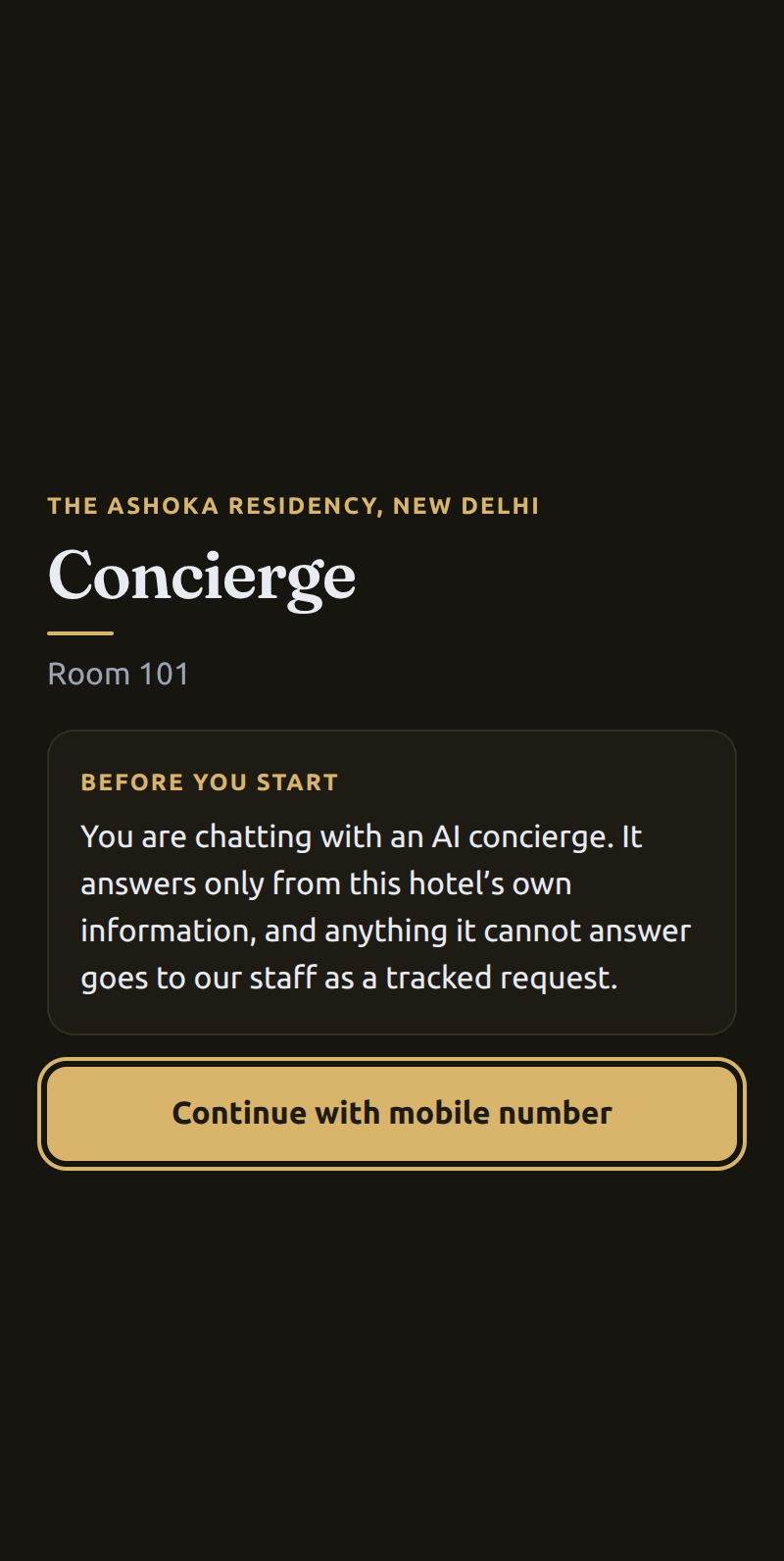
A per-room code opens the web app with the property and room already resolved — no install, no app store, no account. Before anything else the guest is told, in plain words, that this is an AI that answers only from the hotel's own information and passes anything else to staff.
- 2
A mobile number, not a signup
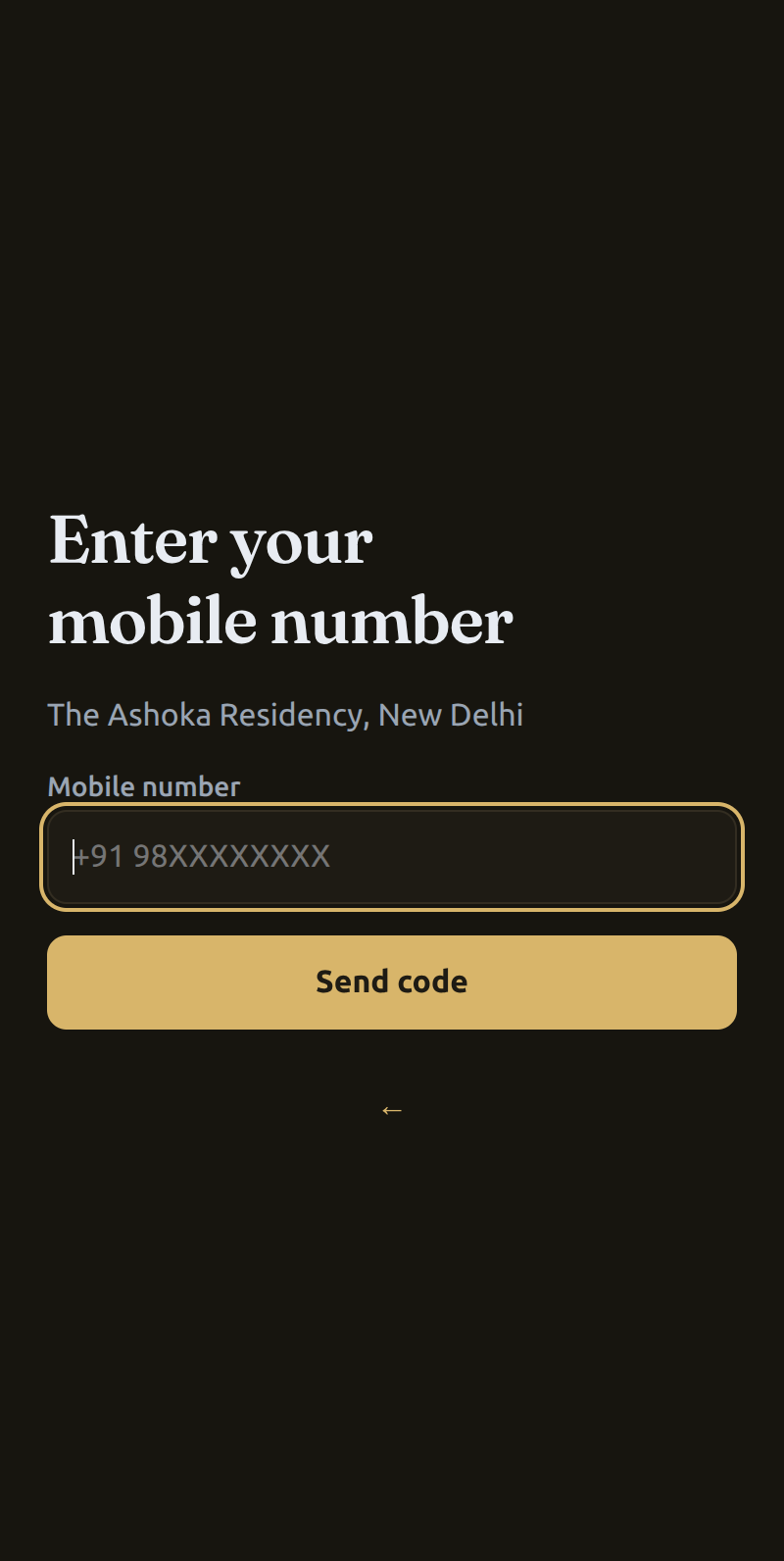
The only identifier asked for is the phone the hotel can already reach. There is no password to choose and no profile to fill in — the shortest path that still lets staff confirm who is in the room.
- 3
One-time code
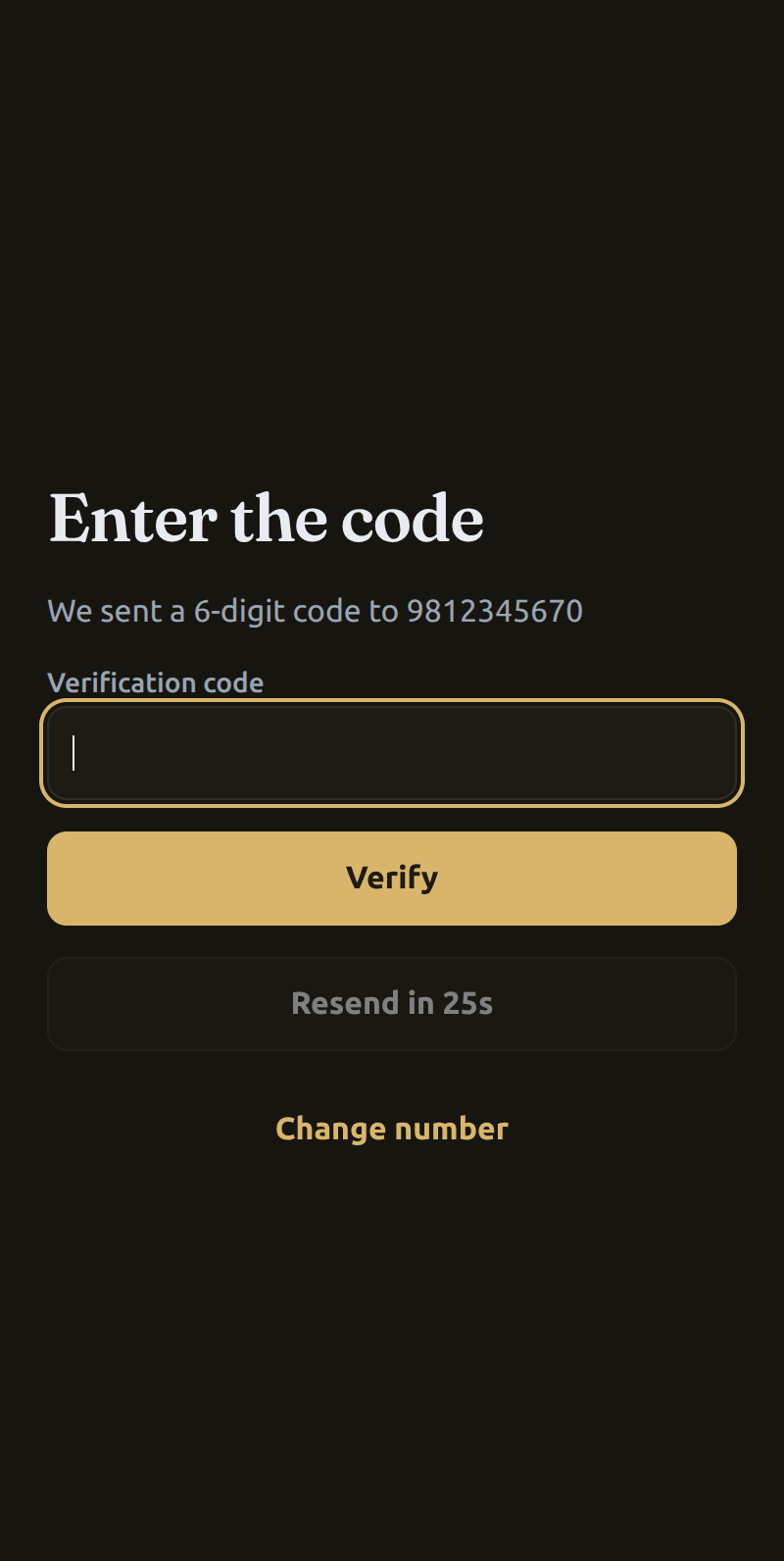
A six-digit code with a resend timer. Wrong codes burn the challenge after a fixed number of attempts, because a six-digit space with unlimited guesses and a fresh challenge every thirty seconds is not a real gate.
- 4
Claim the room
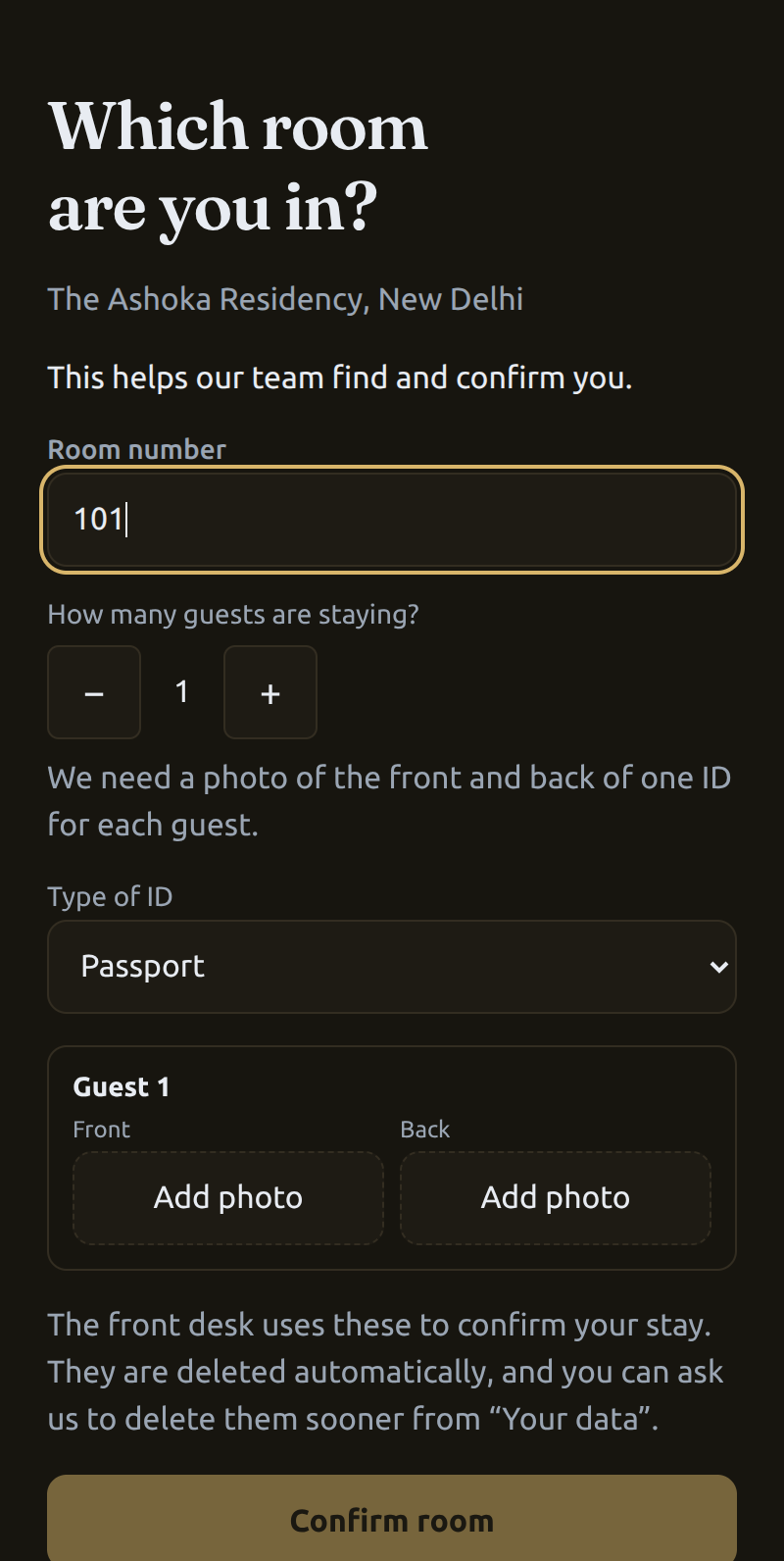
The guest states their room, how many people are staying, and adds ID for each — the same check the front desk does at a physical counter. The screen says who sees the documents, that they are deleted automatically, and how to have them deleted sooner.
- 5
Ask, and get the hotel's own answer
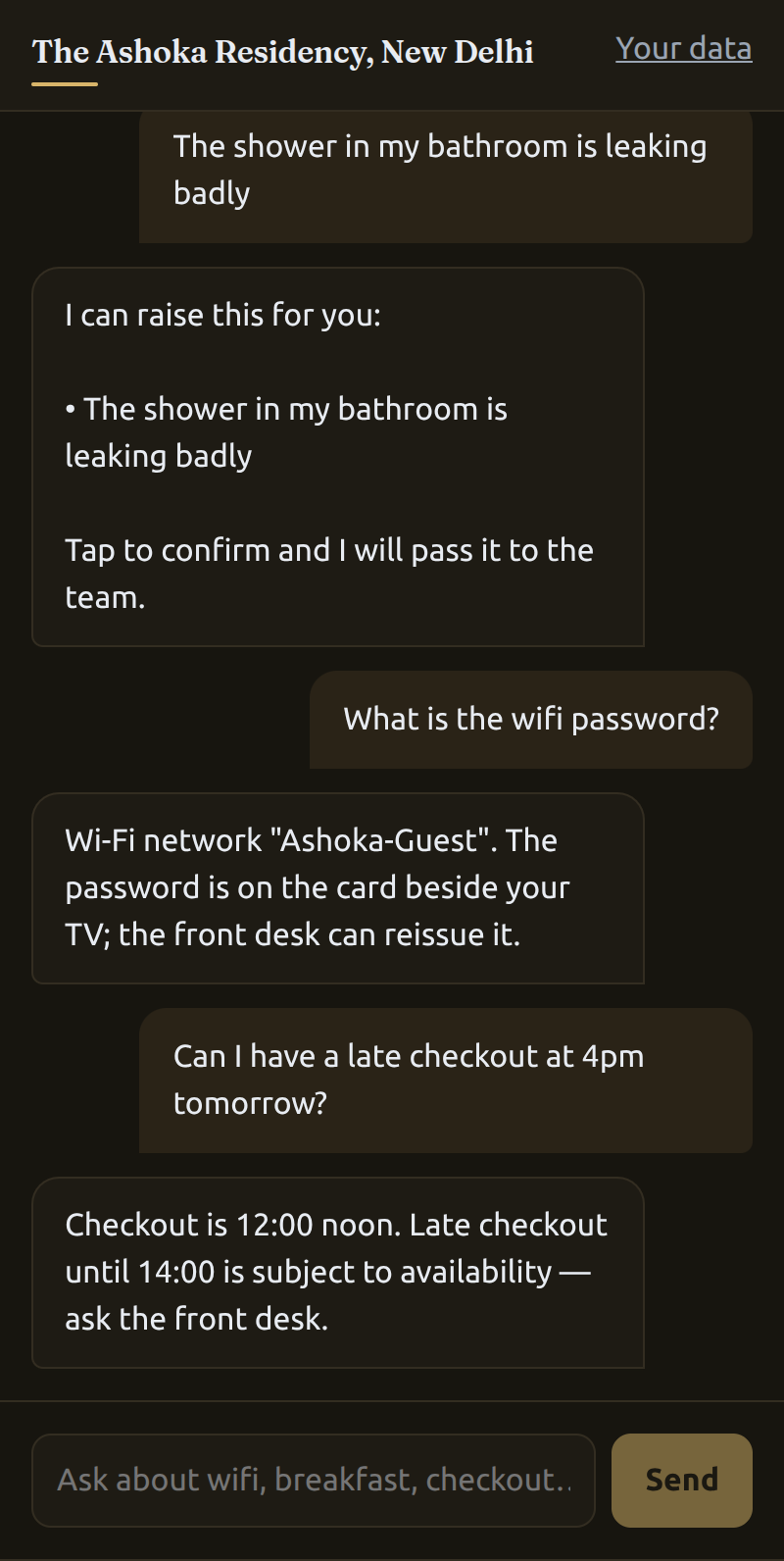
Breakfast hours, the wifi network, the checkout policy — each answered from the property's own knowledge base, not from general knowledge. Note the last exchange: asked for a 4pm late checkout, it does not grant one. It states the actual policy, says late checkout runs only to 14:00 and is subject to availability, and sends the guest to the front desk. Inventing a yes there is the failure this whole design exists to prevent.
- 6
What happens when it can't answer
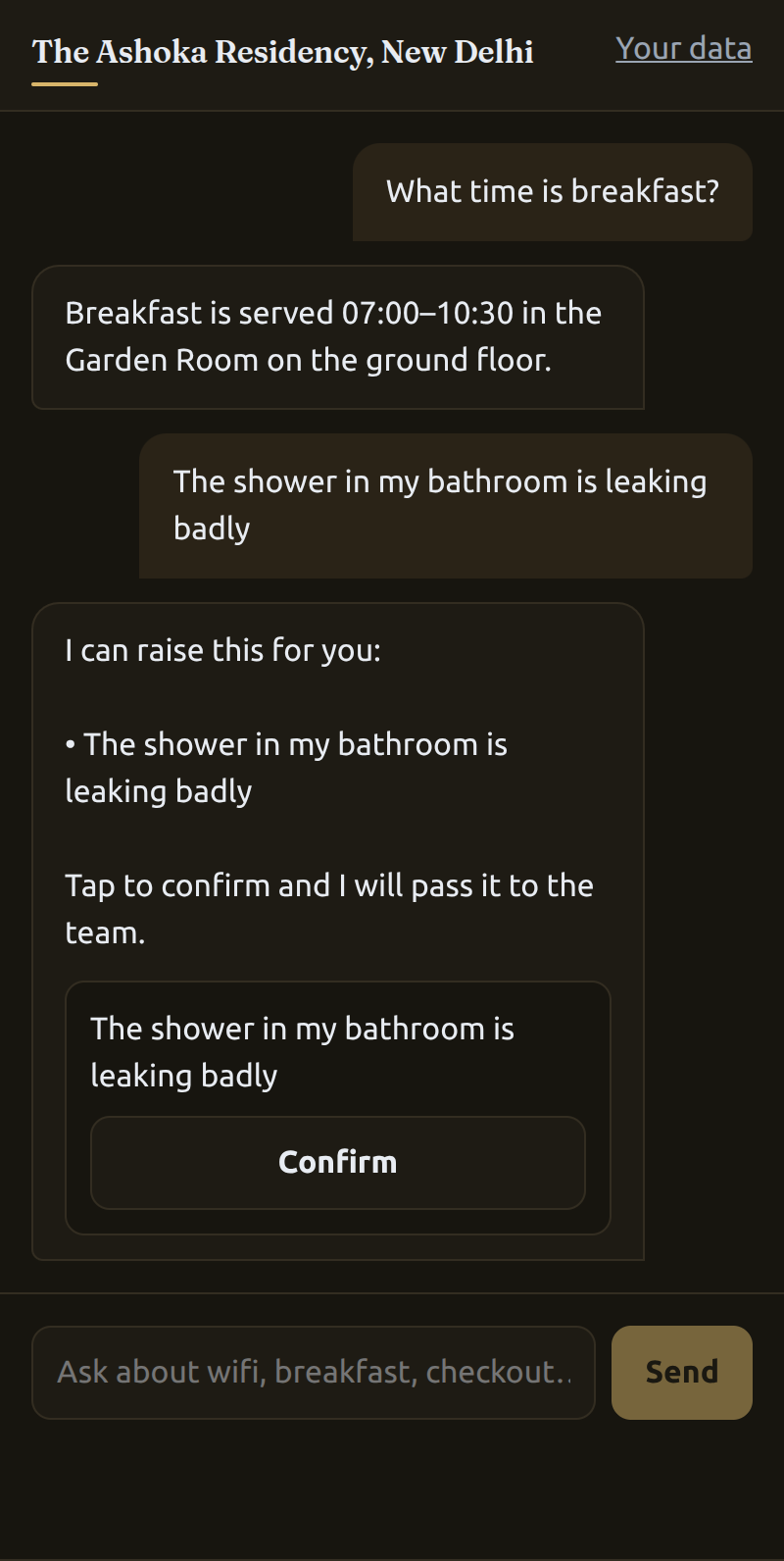
This is the whole design in one screen. Told the shower is leaking, the concierge makes no promise and schedules no repair — it restates the problem, offers to raise it, and waits for the guest to confirm. Understanding the request is the model's job; committing the hotel to something is not.
- 7
It becomes a tracked work item
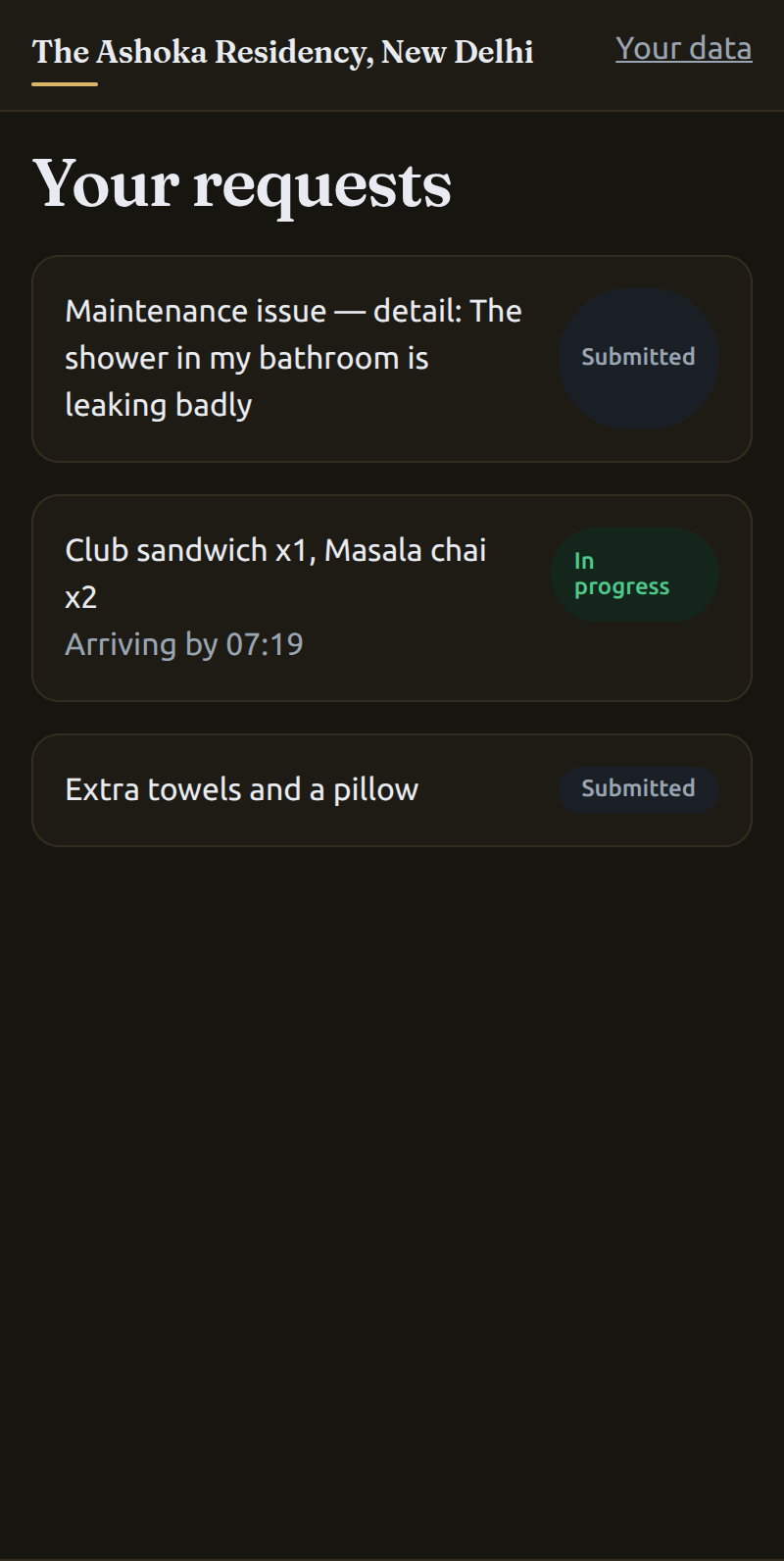
Once confirmed it is a typed request with an owner and a clock, sitting beside the guest's other requests with their live states — submitted, in progress, and an order showing the time it is due to arrive.
- 8
Or skip the conversation entirely
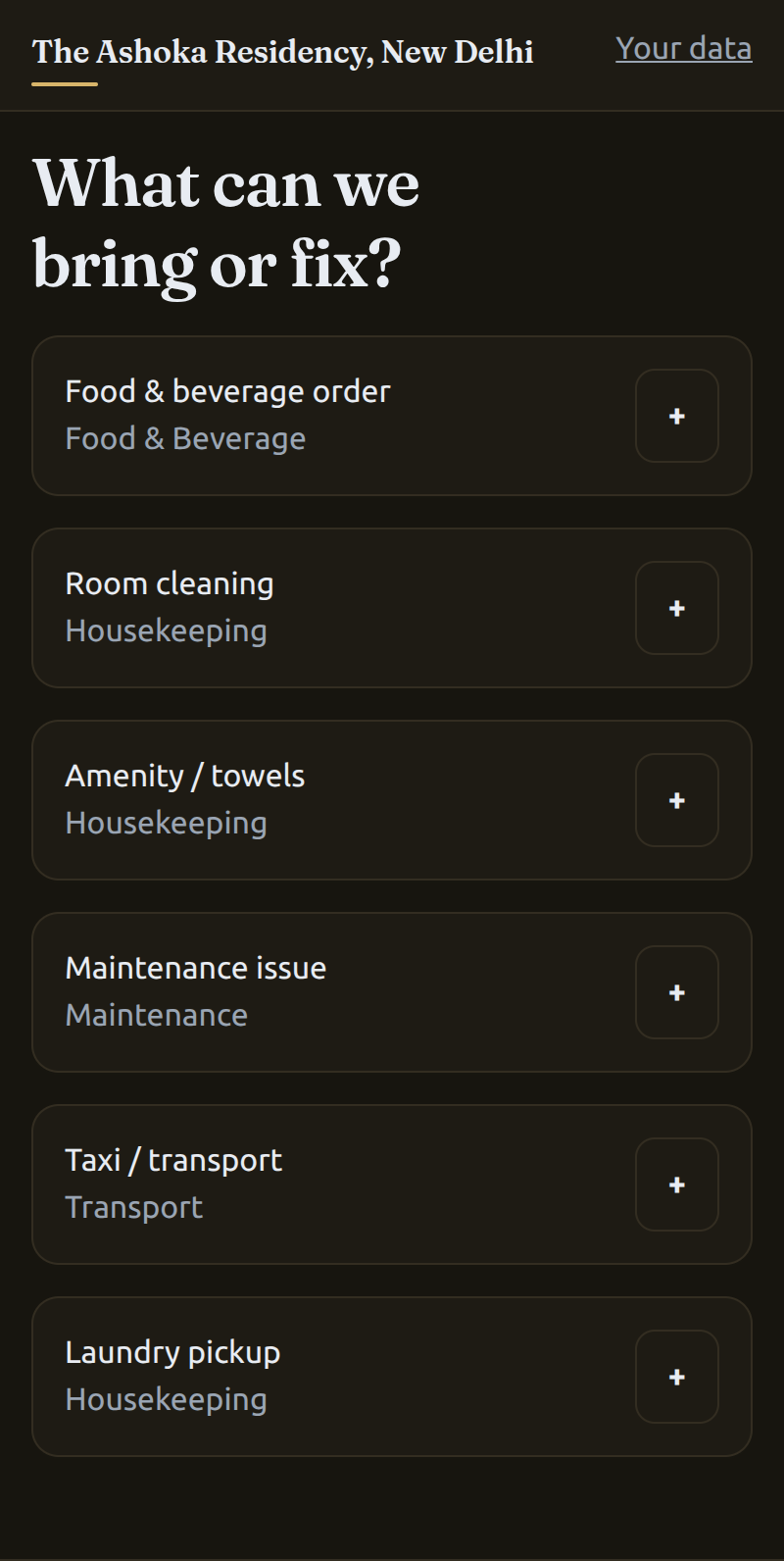
The menu is the same capability set without the chat: each request type listed with the department that owns it, so an order goes to the kitchen and a fault goes to maintenance rather than queuing at a front desk that has to relay it.
- 9
The bill asks who you are again
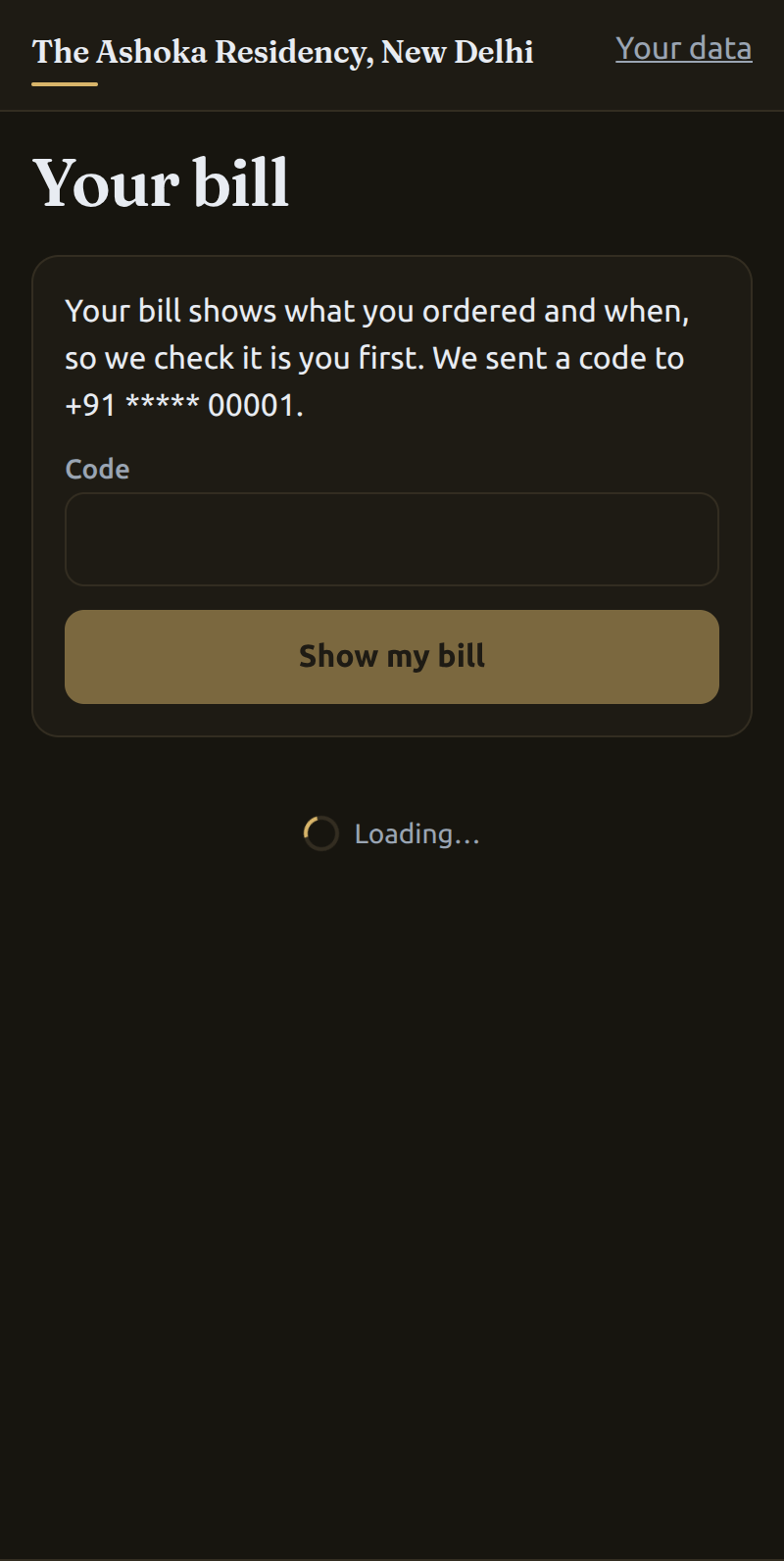
Charges are the one place a room number is not enough. Opening the bill triggers a fresh code to the number on file, so a borrowed phone or a shared room link cannot read what someone else has spent.
- 10
The stay tab, itemised
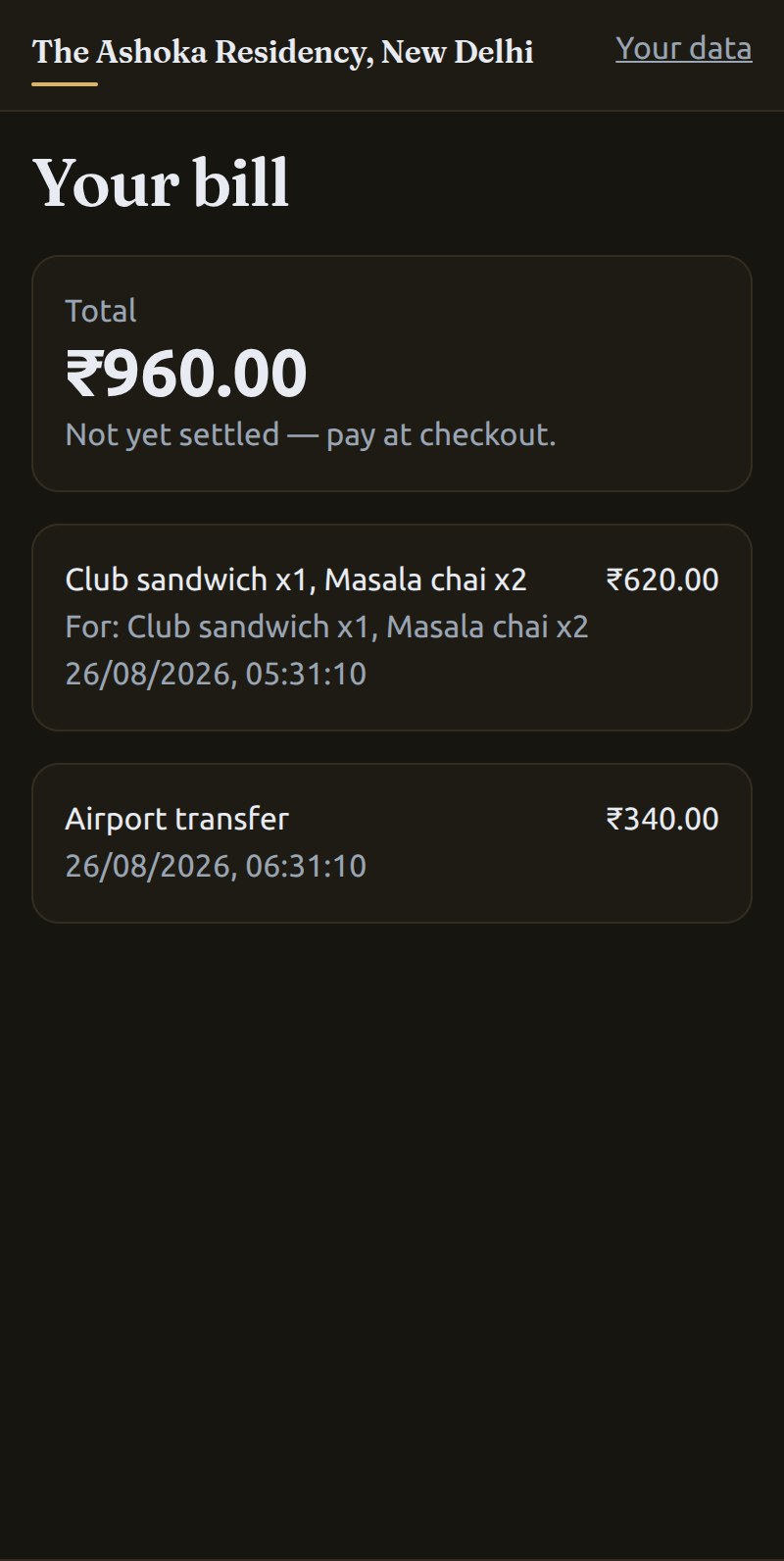
Every charge with what it was for and when it was raised, and a total that is explicitly not settled — this bills to an in-house stay tab rather than a PMS folio, because v1 ships without a PMS integration at all.
Between claiming the room and using the concierge sits an approval gate: the claim is read-only until a staff member approves it, and access is revoked automatically at checkout. The app polls for that transition, so approval and revocation both land without the guest reloading anything.
A request the concierge cannot classify does not stop here — it is filed under a fallback type into a real department with its own SLA, then promoted by an admin. There is no path where a guest asks for something and it lands nowhere.
Admin · web console
The other side of the gate: where a human stays accountable.
The console the hotel's duty manager works in. Signed in here as the seeded admin, these are the screens that decide who gets in, who owns each request, and whether the clock was met.
- 01Approve claims
- 02Watch SLA
- 03Reassign
- 04Promote unclassified
- 05Publish roster
- 1
The approval queue
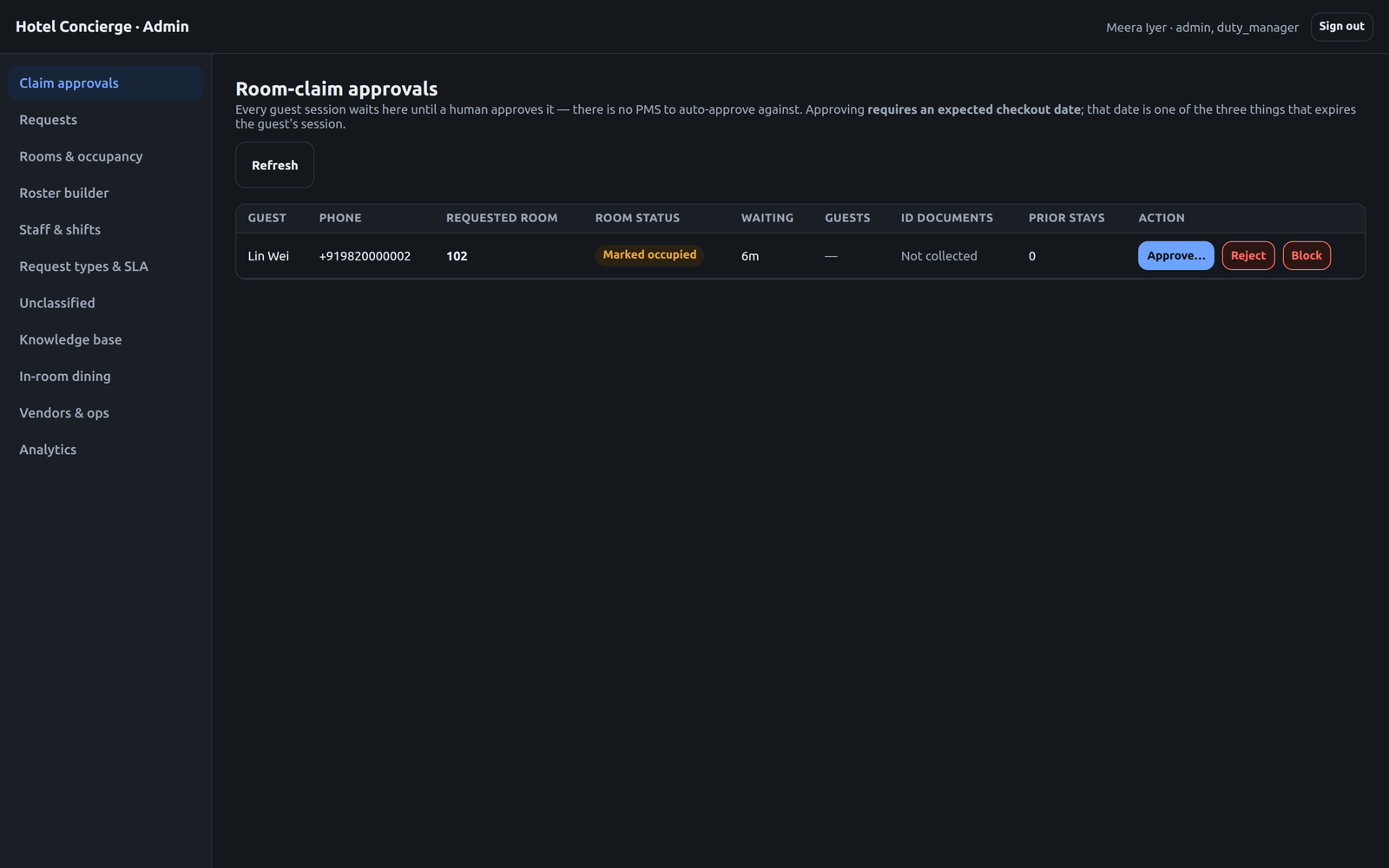
Every guest session waits here until a person approves it — there is no PMS to auto-approve against. The queue shows the requested room, whether the room is already marked occupied, how long the guest has been waiting, whether ID was collected, and how many prior stays they have.
- 2
Approval demands a checkout date
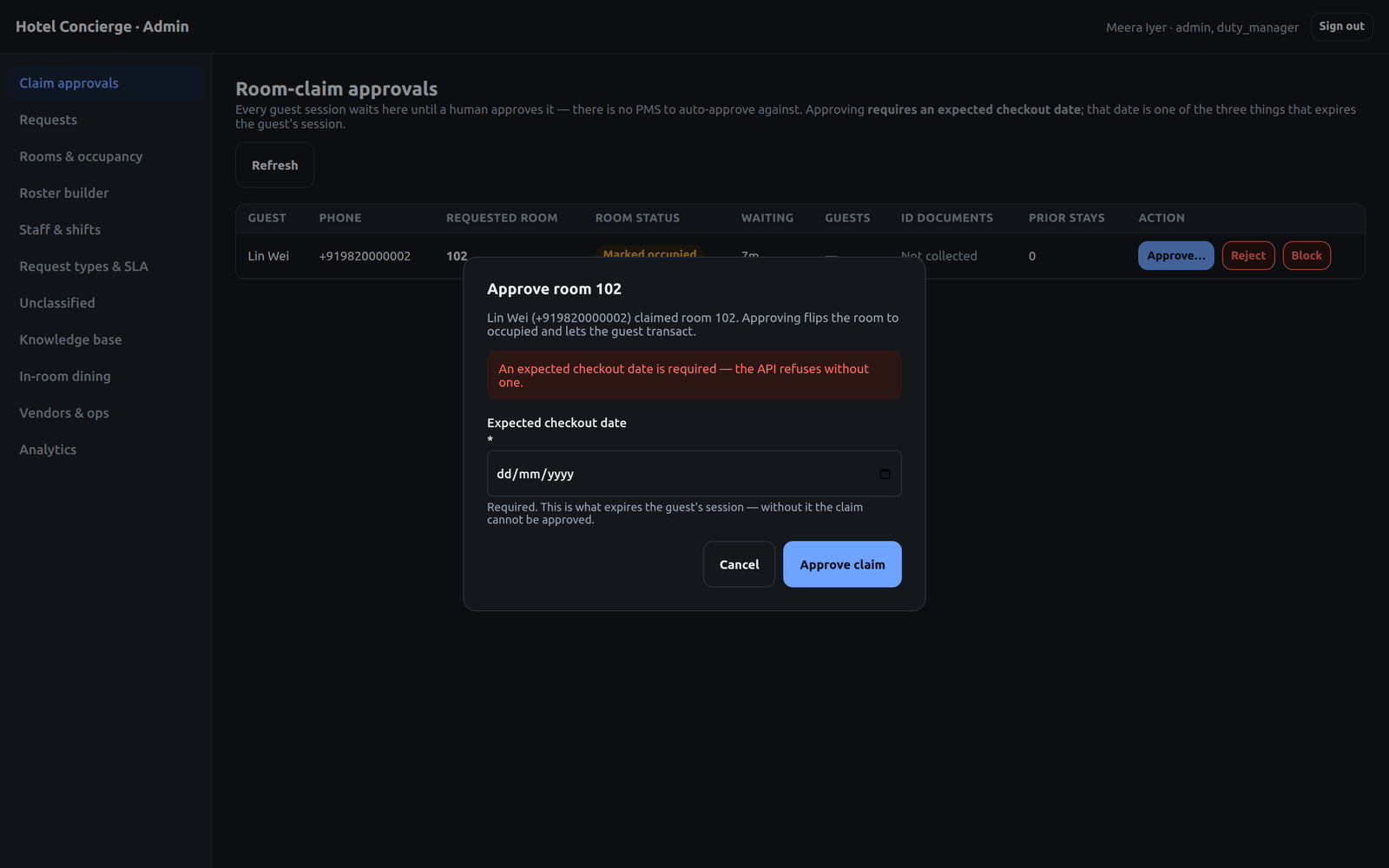
Approving is not a single click: it requires an expected checkout date, because that date is one of the three things that expires the guest's session. Submitting without one is refused by the API, not just by the form — the screenshot is that refusal.
- 3
Every request, with both clocks
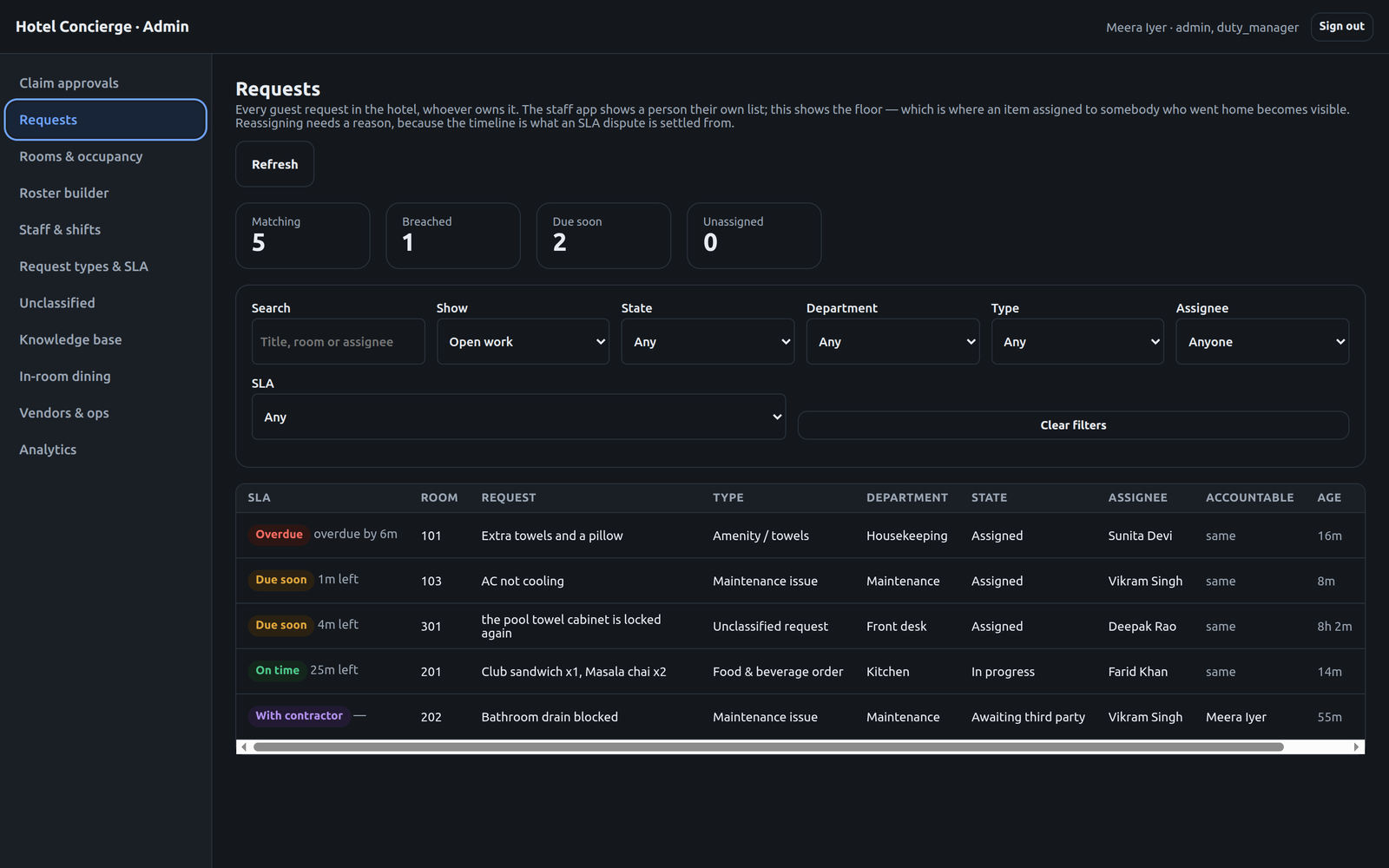
The floor view rather than one person's list — which is how an item assigned to somebody who went home becomes visible. Breached, due-soon and on-time are counted at the top, and each row carries department, state, assignee and the separately tracked accountable owner.
- 4
Accountability moves; the clock does not
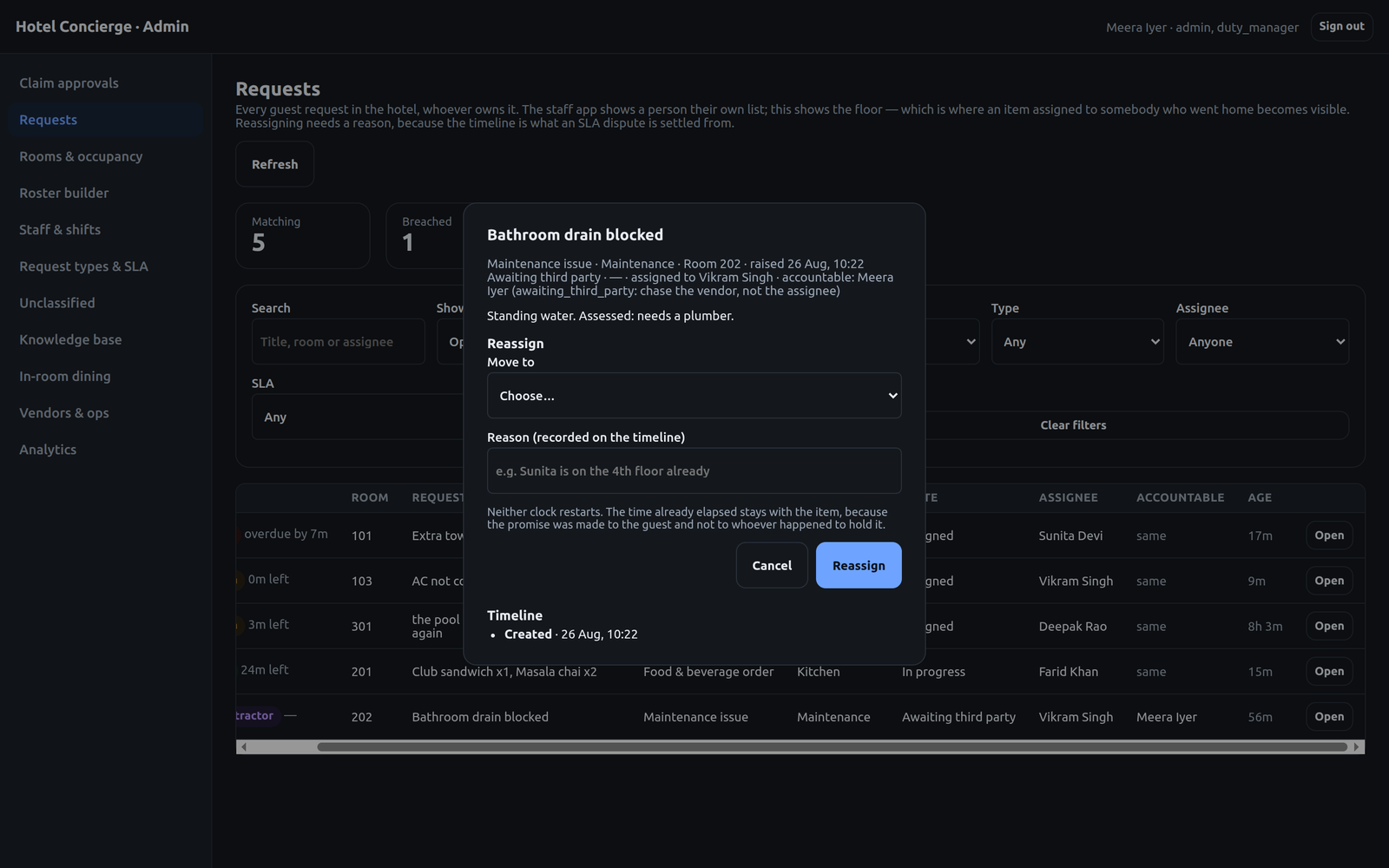
A blocked drain waiting on a plumber: assigned to the engineer, but accountable to the duty manager, with the reason spelled out — chase the vendor, not the assignee. Reassignment needs a written reason because the timeline is what an SLA dispute is settled from, and neither clock restarts, since the promise was made to the guest.
- 5
The fallback bucket, worked
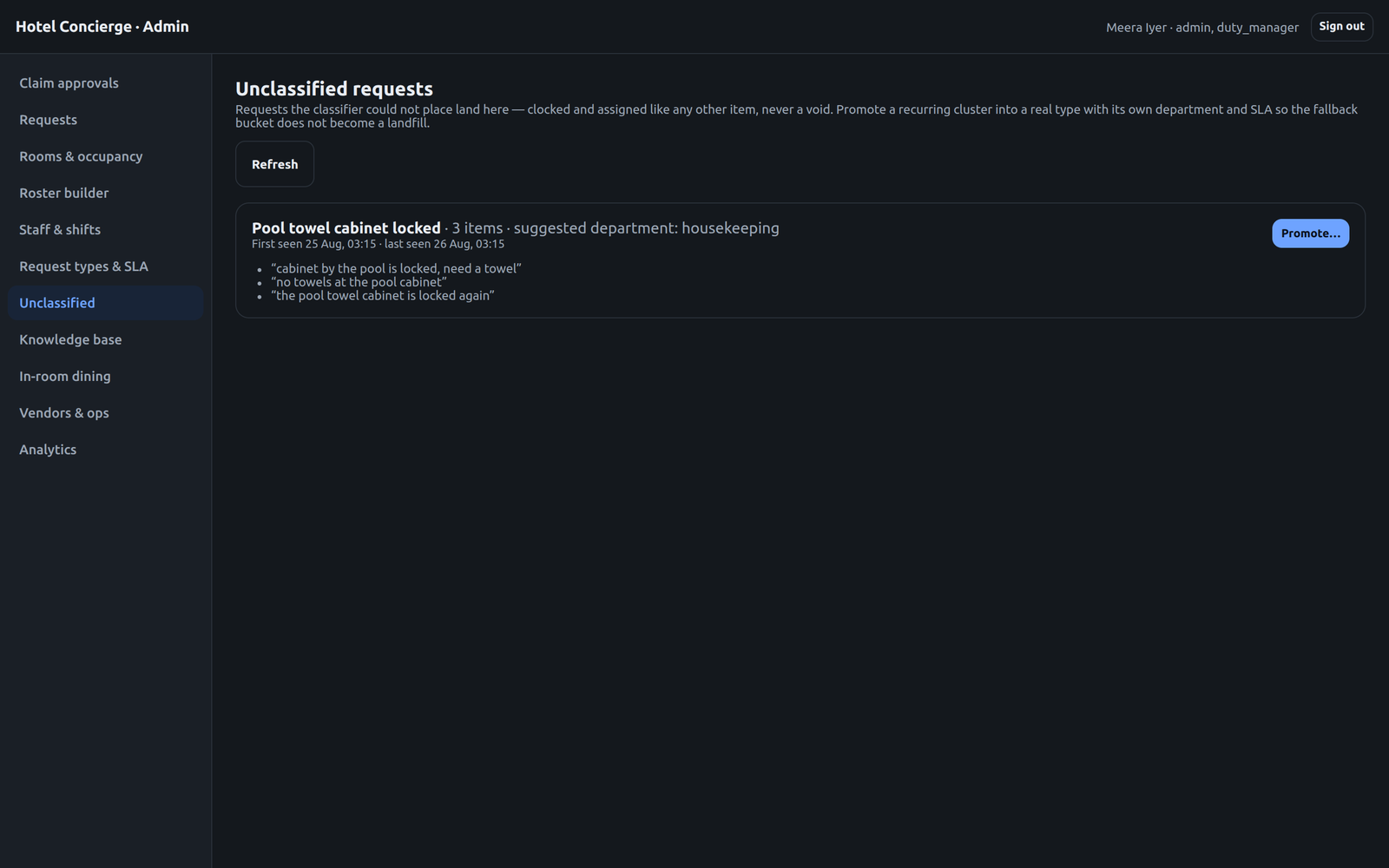
Three differently-worded guest messages about the same locked pool cabinet, clustered with a suggested department. Promoting the cluster turns it into a real request type with its own SLA — which is what stops the unclassified bucket becoming a landfill nobody reads.
- 6
A roster that states its own doubts
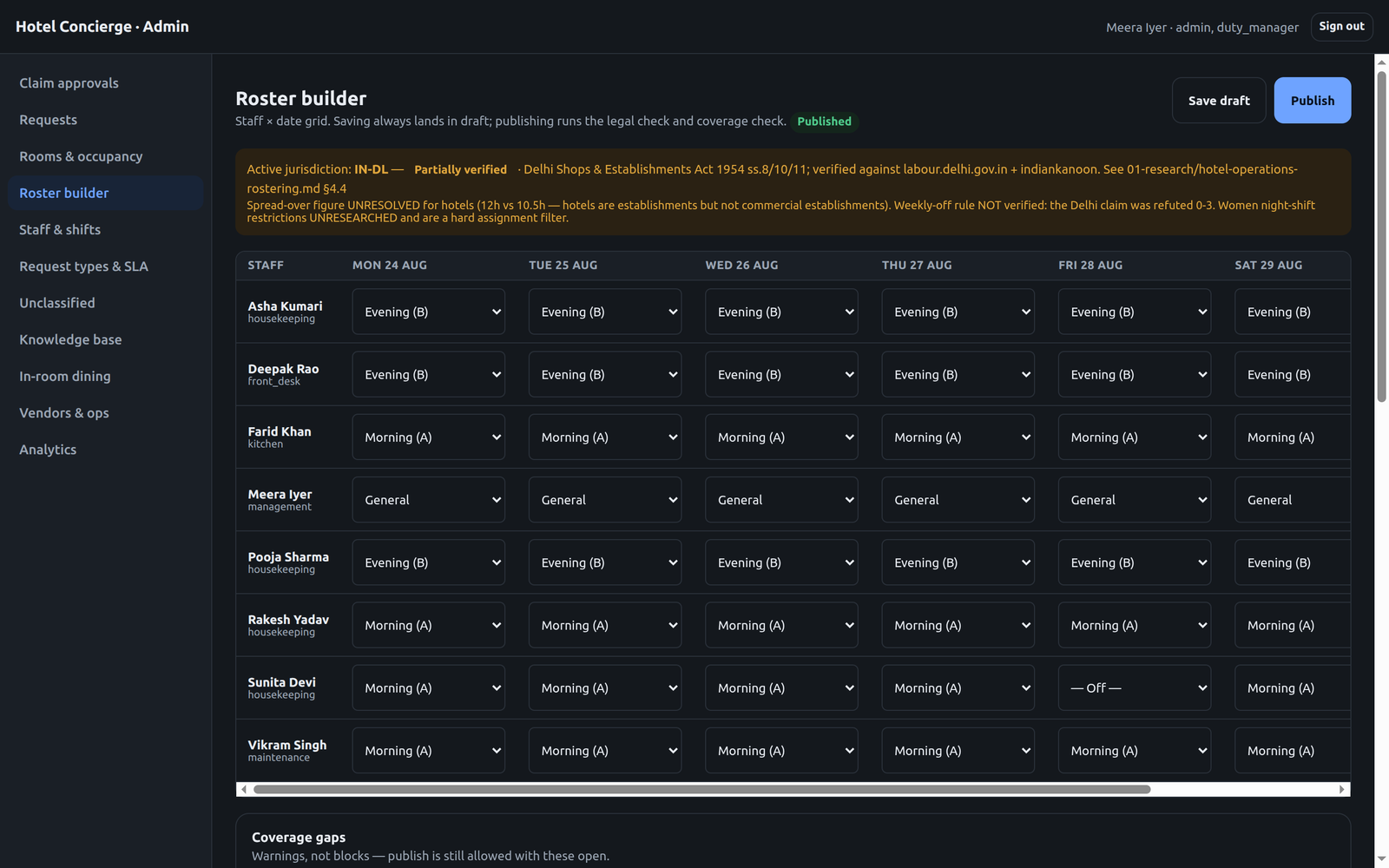
Staff by date, saved as draft and checked on publish. The jurisdiction banner is the notable part: it names the statute, marks itself partially verified, and lists what is still unresolved — including a claim the team checked and refuted. Coverage gaps warn rather than block.
- 7
SLA targets are configuration
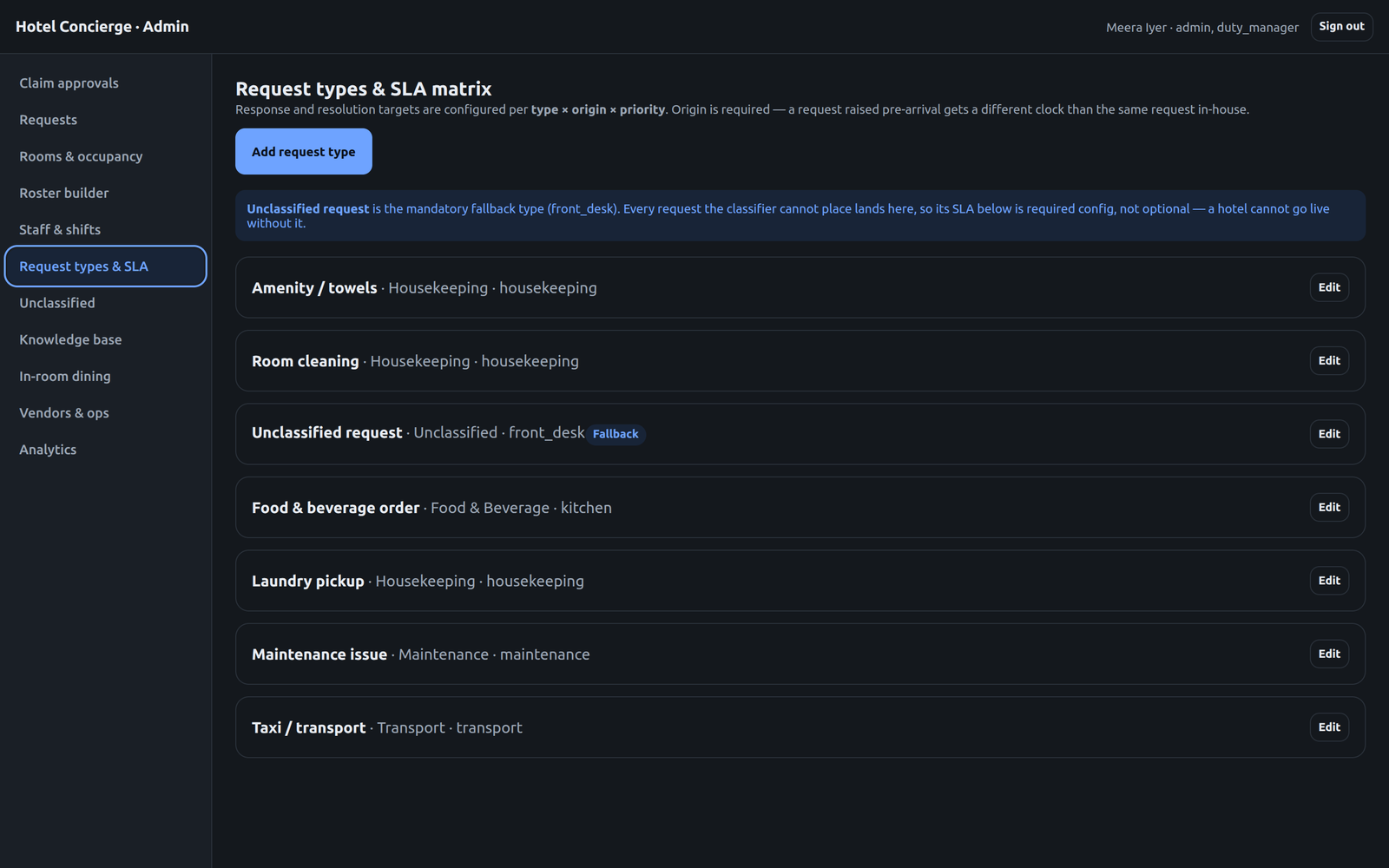
Each request type carries its own department, priority, service calendar and escalation chain. Targets are keyed by origin as well as type, so an in-house request and a pre-arrival one are not held to the same clock.
- 8
Whether the promises were kept
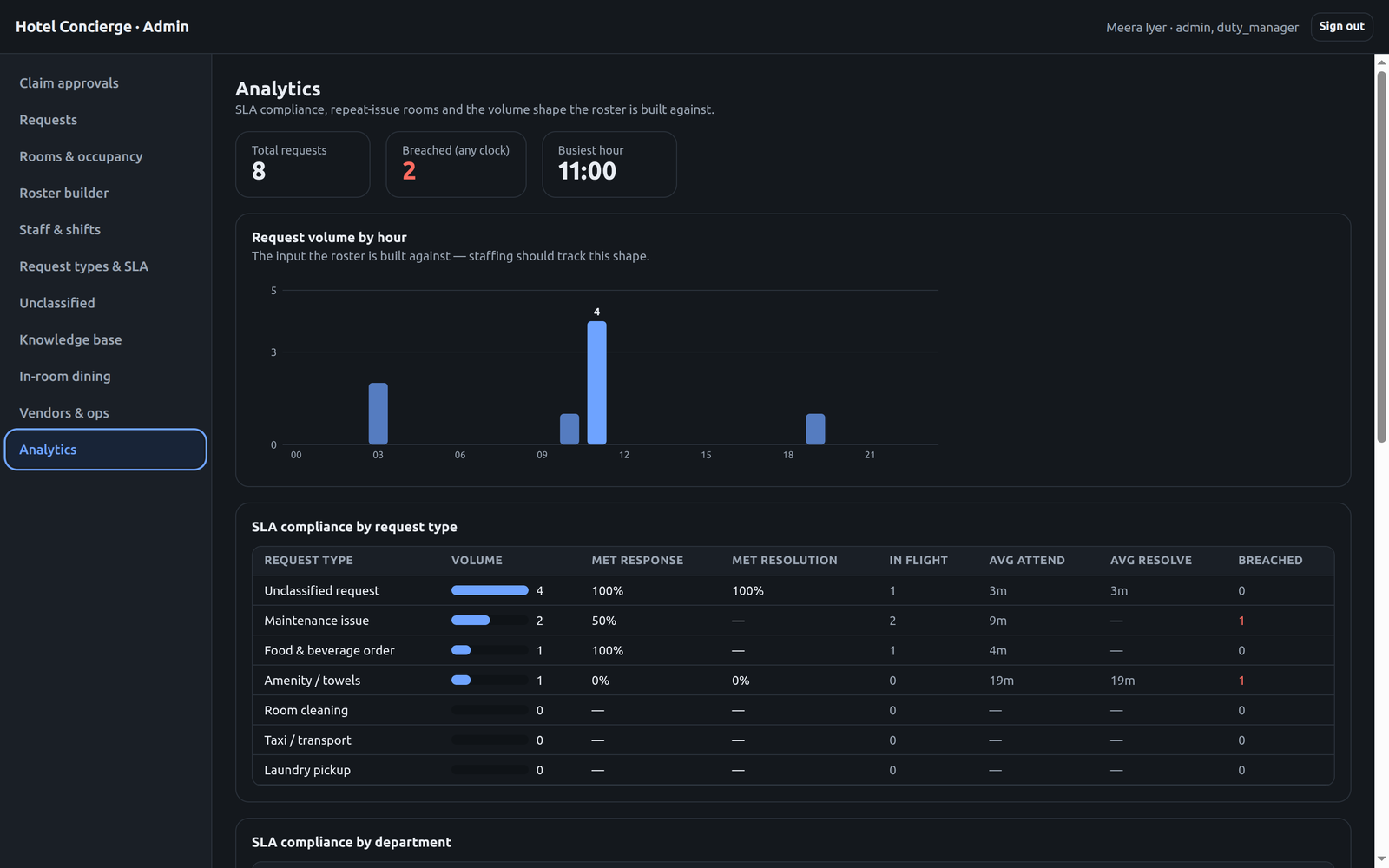
Compliance broken down by request type and department, with attend and resolve averages and a breach count, over request volume by hour — which is the shape the roster is supposed to track. This is where a hotel finds out its housekeeping clock is the one that keeps slipping.
The guest-side approval gate and this queue are the same object seen from two ends: until someone here approves the claim, the guest's app stays read-only, and the guest's session is revoked automatically at the checkout date entered on approval.
04 — Engineering
How it's built: research first, decisions written down.
Four parallel research tracks — competitive landscape, integration ecosystem, AI architecture, and trust/privacy/compliance — fed the product and engineering plan before any code was written. Every non-obvious claim in those documents carries an inline source, and every consequential choice is a numbered ADR.
42 ADRs, including the reversals
Guest data moved server-side, the surface mix changed, and PMS integration was cut from v1 — each recorded as a numbered decision with its reasoning rather than quietly rewritten. The reversals are the useful part of the record: they are what stops the same question being reopened every month.
No PMS integration in v1, on purpose
The India-first launch properties have no usable integration path, so rooms and occupancy are admin-managed and folio posting is replaced by an in-house stay tab. A PmsPort interface is defined with no adapter behind it, which keeps the eventual migration cheap without pretending the integration exists.
One script is the source of truth
The planning documents are authoritative for decisions; verify-all.sh is authoritative for what actually works. It replays every migration from an empty database on demand — added after a run failed in five unrelated-looking places because new migration files only ever reached the database through Docker's initdb hook.
Compliance shaped by the market, not the template
DPDP Act 2023 governs rather than GDPR, and the European working-time research is retained as justification for the roster model rather than loaded as a live ruleset. DPDP is not a weaker GDPR — its obligations differ in shape, and treating it as a subset would have been the easy mistake.
What it runs on
- FastAPI · Python · uvicorn
- PostgreSQL · 13 migrations
- Redis
- React Native + Expo (staff)
- React · Vite (guest · admin)
- Shared TypeScript contract
- Docker Compose · nginx
- WhatsApp/SMS status rail
- verify-all.sh in CI
Why this is on our site: it's the discipline, not the demo.
This is the project where you can see how we make decisions rather than just what we shipped: four research tracks before the first commit, 42 decisions written down with their reversals intact, and a hard line drawn around what the model is allowed to decide. Most client work arrives needing exactly that — someone to work out which parts of an AI feature must be deterministic before it goes anywhere near a paying customer.
Contact
Want one of these for your idea?
Tell us what you're trying to build in 2-3 sentences. We reply within one business day.
Or skip the form — book a Calendly slot directlyadmin@neuroxai.com · +91 70149 99768
Remote-first team across India · US · EU · HQ in Udaipur, India